class: center, middle, inverse, title-slide # R for Data Analysis | NTFAQ ## <span style="display:block; text-align:center;"><img src="https://pbs.twimg.com/media/DNhps0gUQAAcS55.jpg" width="620"></span> --- class: inverse # .bigtext[How can I analyze my data?] -- <br> .bump-right[ ## ...and not want to throw my computer in the lake? ] -- <br> .bump-right[ ## ...and be able to show someone what I did? ] -- <br> .bump-right[ ## ...and have it still make sense 2 years from now? ] --- class: inverse # .scary[R training is coming this Fall...] .fade[.center[ <img src='http://lazerhorse.org/wp-content/uploads/2013/06/Old-Horror-Films-Retro-Film-Posters-The-Brain-Eaters.jpg' width="88%" style="margin-top: -34px;"> ]] --- class: inverse # R Camp .center[ <a href="https://mpca-air.github.io/RCamp/"> <img src='images/RCamp.png' width="70%" style="margin-top: -20px;"></a> ] --- class: inverse # Air data methods .center[ <a href="https://mpca-air.github.io/air-methods/"> <img src='images/methods_book.png' width="70%" style="margin-top: -20px;"></a> ] --- class: white, center background-image: url("http://blogs.reed.edu/datablog/files/2015/09/RStudio-Ball.png") background-position: 50% 50% background-size: 87% .lower[.center-text[ # is community sourced ]] --- <div style="margin-top: -20px;"> .center[] </div> .center[ __R is spreading.__] People all around the world contribute to and maintain R. A main focus is making it friendlier and easier to use. Imagine 1,000's of graduate students, non-profits, scientists, and data enthusiasts all working to provide you with tools to help analyze and visualize your data. --- class: center, middle # Top 10 reasons to use R <br><br> --- # 1| Dynamic tools [](https://air-data.shinyapps.io/Metro_shiny_roses/) .work[It all started with a [Pollution Rose](https://air-data.shinyapps.io/Metro_shiny_roses/).] --- class: middle <div class="note"> We began learning R and we were no longer at the whims of changing budgets because... </div> <br><strong><i>...Drum roll please...</strong></i><br> --- # 2| **R is FREE!** -- __Let's install R.__ [Click here!](https://mpca-air.github.io/NTF_learn_R/00_Install.html) __You can download R right now. We will wait.__ -- <div class="note"> How does R work?</div> -- R lets you perform data analysis like you're writing a recipe for chocolate chip cookies. Once you've written your favorite recipe you can use it over and over again or share it with your favorite collaborators and grandkids. .center[] --- # A data recipe <img src="images/cupcake_gif.gif" align="right" width="25%" style="margin-right: 140px; margin-top: -20px;"> <br> ### __Summarized air data__ .smalltext[ _Servings: 1 to 10_ ] 1. Download monitoring data from AQS. 2. Plot the data. 3. Remove bad data. 4. Make more plots. 5. Summarize the data. 6. Save the results. --- class: inverse, center, middle # 3| There is lots of help --  .bigtext[Let's say we have Excel data.] -- <br> .bigtext[How do we get it into R?] -- <br><br> _I don't know._ -- <br><br> __Let's Google it!__ --- # 4| There's a new package for you When someone shares their analysis recipe or new tool in R, they wrap everything together into a __package__. Packages in R are like Apps for your phone -- you load them each time you want to do something special. <img src="https://www.rstudio.com/wp-content/uploads/2017/05/readxl-400x464.png" width="345" align="left" style="margin-right: 40px; margin-top: 10px;"> <br> Since this data is stored in an Excel file we can load the __readxl__ package, which gives R the power to read data from Excel. ```r install.packages("readxl") ``` ```r library(readxl) ``` ```r data <- read_excel("data.xlsx", sheet = "2014") ``` --- # Package stickers __readxl__ is only one of many helpful R packages out there. Here's a sample of our favorites. We have lots of stickers and you should take some with you. Many are for a variety of R communities. <img src="https://i.pinimg.com/736x/e6/50/80/e650804e9948b5b8b9c231285a576f1b--gears-stickers.jpg" width="335" align="left" style="margin-left: 70px; margin-top: 50px;"> <img src="https://www.rstudio.com/wp-content/uploads/2017/05/readxl-400x464.png" width="120" align="right" style="margin-right: 180px; margin-top: 280px;"> --- # 5| Read all flavors of data These packages give R the ability to read data from almost any place it may be stored. R can talk to SQL databases, read data saved from other statistical software, and pull data directly from the internet. -- ### R can talk data with: - AirNow -- - AQS -- - NOAA -- - Dropbox, FTP sites -- - PDFs -- - SQL databases -- - **.scary[ZIP files, large text files, air modeling output]** -- <div style="margin-top: -250px;"> .center[ <span style="font-size: 30px;"> __Let's try it!__ <i class="fas fa-bicycle "></i> </span> ] </div> --- # Read Excel file First take a gander at the data. It's online [HERE](https://github.com/MPCA-air/NTF_learn_R/raw/master/data/Hourly/AQS_1hr_FondduLac.xlsx). -- <br><br> To load the Excel data into R: `1.` Download the file. ```r download.file("https://github.com/MPCA-air/NTF_learn_R/raw/master/data/Hourly/AQS_1hr_FondduLac.xlsx", "AQS_FondduLac.xlsx", mode = "wb") ``` -- `2.` Read the __2014__ tab. ```r data_2014 <- read_excel("AQS_FondduLac.xlsx", sheet = "2014") ``` -- `3.` Read the __2015__ tab. ```r data_2015 <- read_excel("AQS_FondduLac.xlsx", sheet = "2015") ``` --- # AirNow | Today's AQI ```r library(tidyverse) # Connect to AirNow for current observations airnow_link <- paste0("https://s3-us-west-1.amazonaws.com//files.airnowtech.org/airnow/today/HourlyData_", format(Sys.time()-60*75, "%Y%m%d%H", tz = "GMT"), ".dat") # Read a "|" delimited file with no column names - Thanks EPA! aqi_now <- read_delim(airnow_link, "|", col_names = F) # Add column names names(aqi_now) <- c("date", "time", "aqsid", "city", "local_time", "parameter", "units", "concentration", "agency") # Filter to Ozone and PM2.5 aqi_fond <- filter(aqi_now, parameter %in% c("OZONE", "PM2.5"), aqsid == "270177417") ``` -- <table> <thead> <tr> <th style="text-align:left;"> city </th> <th style="text-align:left;"> date </th> <th style="text-align:left;"> time </th> <th style="text-align:right;"> local_time </th> <th style="text-align:left;"> parameter </th> <th style="text-align:right;"> concentration </th> <th style="text-align:left;"> units </th> </tr> </thead> <tbody> <tr> <td style="text-align:left;"> Fond du Lac </td> <td style="text-align:left;"> 05/16/18 </td> <td style="text-align:left;"> 12:00:00 </td> <td style="text-align:right;"> -6 </td> <td style="text-align:left;"> OZONE </td> <td style="text-align:right;"> 50 </td> <td style="text-align:left;"> PPB </td> </tr> <tr> <td style="text-align:left;"> Fond du Lac </td> <td style="text-align:left;"> 05/16/18 </td> <td style="text-align:left;"> 12:00:00 </td> <td style="text-align:right;"> -6 </td> <td style="text-align:left;"> PM2.5 </td> <td style="text-align:right;"> 6 </td> <td style="text-align:left;"> UG/M3 </td> </tr> </tbody> </table> --- # AirNow | the Worst air award ```r # Filter to Ozone and PM2.5 aqi_worst <- filter(aqi_now, parameter %in% c("OZONE", "PM2.5")) # Arrange from worst to best air aqi_worst <- arrange(aqi_worst, desc(concentration)) ``` -- ### Ozone ```r # Select Ozone results filter(aqi_worst, parameter == "OZONE") ``` <table> <thead> <tr> <th style="text-align:left;"> agency </th> <th style="text-align:left;"> city </th> <th style="text-align:left;"> date </th> <th style="text-align:left;"> time </th> <th style="text-align:left;"> parameter </th> <th style="text-align:right;"> concentration </th> <th style="text-align:left;"> units </th> </tr> </thead> <tbody> <tr> <td style="text-align:left;"> National Park Service </td> <td style="text-align:left;"> Mojave NPr </td> <td style="text-align:left;"> 05/16/18 </td> <td style="text-align:left;"> 12:00:00 </td> <td style="text-align:left;"> OZONE </td> <td style="text-align:right;"> 76 </td> <td style="text-align:left;"> PPB </td> </tr> <tr> <td style="text-align:left;"> National Park Service </td> <td style="text-align:left;"> Death Valley NP </td> <td style="text-align:left;"> 05/16/18 </td> <td style="text-align:left;"> 12:00:00 </td> <td style="text-align:left;"> OZONE </td> <td style="text-align:right;"> 62 </td> <td style="text-align:left;"> PPB </td> </tr> <tr> <td style="text-align:left;"> South Coast AQMD </td> <td style="text-align:left;"> Crestline - Lake Gre </td> <td style="text-align:left;"> 05/16/18 </td> <td style="text-align:left;"> 12:00:00 </td> <td style="text-align:left;"> OZONE </td> <td style="text-align:right;"> 61 </td> <td style="text-align:left;"> PPB </td> </tr> </tbody> </table> --- # AirNow | the Worst air award <br><br> ### PM2.5 ```r # Select PM2.5 results filter(aqi_worst, parameter == "PM2.5") ``` -- <table> <thead> <tr> <th style="text-align:left;"> agency </th> <th style="text-align:left;"> city </th> <th style="text-align:left;"> date </th> <th style="text-align:left;"> time </th> <th style="text-align:left;"> parameter </th> <th style="text-align:right;"> concentration </th> <th style="text-align:left;"> units </th> </tr> </thead> <tbody> <tr> <td style="text-align:left;"> U.S. Department of State Bangladesh - Dhaka </td> <td style="text-align:left;"> Dhaka </td> <td style="text-align:left;"> 05/16/18 </td> <td style="text-align:left;"> 12:00:00 </td> <td style="text-align:left;"> PM2.5 </td> <td style="text-align:right;"> 110 </td> <td style="text-align:left;"> UG/M3 </td> </tr> <tr> <td style="text-align:left;"> U.S. Department of State China - Beijing </td> <td style="text-align:left;"> Beijing </td> <td style="text-align:left;"> 05/16/18 </td> <td style="text-align:left;"> 12:00:00 </td> <td style="text-align:left;"> PM2.5 </td> <td style="text-align:right;"> 71 </td> <td style="text-align:left;"> UG/M3 </td> </tr> <tr> <td style="text-align:left;"> U.S. Department of State Indonesia - Jakarta </td> <td style="text-align:left;"> Jakarta South </td> <td style="text-align:left;"> 05/16/18 </td> <td style="text-align:left;"> 12:00:00 </td> <td style="text-align:left;"> PM2.5 </td> <td style="text-align:right;"> 56 </td> <td style="text-align:left;"> UG/M3 </td> </tr> </tbody> </table> --- # 6| Any plot for any data  <br> The _ggplot2_ package has functions to make almost any plot you can think of. It can also layer plots on top of each other to add multiple elements. ```r install.packages("ggplot2") ``` __The fun can start now.__ <i class="fas fa-rocket "></i> --- # Making a `ggplot()` sandwich  --- # A bar plot ```r library(tidyverse) pm_data <- filter(data_2015, Parameter == 88101) %>% group_by(site_catid) %>% summarize(Conc = mean(Conc, na.rm = T)) ggplot(data = pm_data, aes(x = site_catid, y = Conc)) + geom_col() + labs(title = "2015 PM2.5 Concentrations", y = "ug/m3", x = "site") ``` <img src="NTF_Demo_files/figure-html/unnamed-chunk-18-1.png" width="650px" height="400px" /> --- # .inverse[`geom_boxplot()`] ```r pm_data <- filter(data_2015, Parameter == 88101) ggplot(data = pm_data, aes(x = site_catid, y = Conc, fill = site_catid)) + geom_boxplot(show.legend = FALSE) + labs(y = "ug/m3", x = "site", title = "2015 PM2.5 Concentrations") + scale_y_log10() ``` <img src="NTF_Demo_files/figure-html/unnamed-chunk-19-1.png" width="1100px" height="390px" /> --- # beeswarm ```r library(ggbeeswarm) #install.packages("ggbeeswarm") ggplot(pm_data, aes(y = site_catid, x = Conc, color = Conc)) + geom_quasirandom(groupOnX = F, alpha = .035, show.legend = FALSE, size = 2) + labs(title = "PM2.5 Results (ug/m^3)", y = "site", x = "ug/m3") + xlim(0, 60) ``` <img src="NTF_Demo_files/figure-html/unnamed-chunk-20-1.png" width="100%" height="422px" /> --- # AQI summary ```r source("https://raw.githubusercontent.com/dKvale/aqi-watch/master/R/aqi_convert.R") pm_data <- group_by(pm_data, site_catid, Date) %>% summarize(Conc = mean(Conc, na.rm = T)) %>% mutate(aqi_color = conc2color(Conc, "PM25") %>% factor(levels = c("#DB6B1A", "#FFEE00", "#53BF33"))) %>% arrange(aqi_color) ggplot(data = pm_data, aes(x = site_catid)) + geom_bar(aes(fill = aqi_color), show.legend = F) + scale_fill_manual(values = as.character(unique(pm_data$aqi_color))) + labs(title = "2015 AQI results for PM2.5", y = "Days", x = "Site") ``` <img src="NTF_Demo_files/figure-html/unnamed-chunk-21-1.png" width="780px" height="384px" /> --- # AQI waffles ```r library(waffle) #devtools::install_github("hrbrmstr/waffle") pm_sums <- group_by(pm_data, site_catid, aqi_color) %>% summarize(count = n()) %>% arrange(desc(aqi_color)) %>% ungroup() %>% mutate(aqi_color = forcats::fct_recode(aqi_color, Good = "#53BF33", Moderate = "#FFEE00", `Unhealthy` = "#DB6B1A")) iron( waffle(filter(pm_sums, site_catid == "27-017-7417") %>% select(aqi_color, count), rows = 7, size = 0.3, colors = c("#65B345", "#f2d01a"), title = "Fond du Lac AQI :: 2015") + theme(legend.position="left", legend.text=element_text(size=26), plot.title=element_text(size=32)), waffle(filter(pm_sums, site_catid == "27-137-7549") %>% select(aqi_color, count), rows = 7, size = 0.3, colors = rev(c("#F26522", "#F2D01A", "#65B345")), xlab = "1 square = 1 day", title = "Duluth AQI :: 2015") + theme(legend.position="left", legend.text=element_text(size=26), plot.title=element_text(size=32), axis.title.x=element_text(size=28))) ``` <!-- --> --- # Calendar plot ```r library(openair) #install.packages("openair") library(lubridate) data_fond <- filter(pm_data, site_catid == "27-017-7417", month(Date) < 10) %>% rename(date = Date) # openair requires date column to be named "date" calendarPlot(data_fond, pollutant = "Conc", statistic = "mean", year = 2015, annotate = "value", digits = 0, key.footer = "ug/m3", par.settings = list(fontsize=list(text=22), layout.heights=list(top.padding=-1)), main = "PM2.5 Concentrations at Fond du Lac, 2015") ``` <!-- --> --- # Time series ```r filter(pm_data, site_catid == "27-017-7417") %>% group_by(Date) %>% summarize(Conc = median(Conc, na.rm = T)) %>% ggplot(aes(x = as.Date(Date), y = Conc, na.rm = T)) + geom_line(size = 2.2, color = "tomato", size = 3) + geom_point(alpha = 0.5, size = 7.5) + geom_smooth() + ylab("Concentration (ug/m3)") + xlab("") + ggtitle("PM2.5 at Fond du Lac in 2015") + geom_label(aes(x = as.Date("2015-07-23"), y = 32), fill = "steelblue", label = "the BIG July Event", size = 10) ``` <!-- --> --- # Time series - _split by hour_ ```r library(lubridate) pm_data <- filter(data_2015, site_catid == "27-017-7417", Parameter == 88101) ggplot(pm_data, aes(x = Hour, y = Conc)) + geom_point(alpha = 0.2, size = 2) + geom_smooth() + labs(y="Concentration (ug/m3)", x="Hour", title="PM2.5 at Fond du Lac in 2015") + facet_wrap(~wday(Date, label = T), ncol = 4) + scale_y_log10() ``` <!-- --> --- # Time series - _split by weekday_ ```r pm_data %>% mutate(color = ifelse(wday(Date) == 7 & month(Date) == 6, "red", "blue")) %>% ggplot(aes(x = wday(Date, label = T), y = Conc)) + geom_boxplot(aes(fill = color), outlier.alpha = 0, show.legend = F) + geom_jitter(alpha = 0.2, size = 2) + ylab("Concentration (ug/m3)") + xlab("") + ggtitle("PM2.5 at Fond du Lac in 2015") + facet_wrap(~month(Date, label = T), ncol = 4) + scale_y_log10() ``` 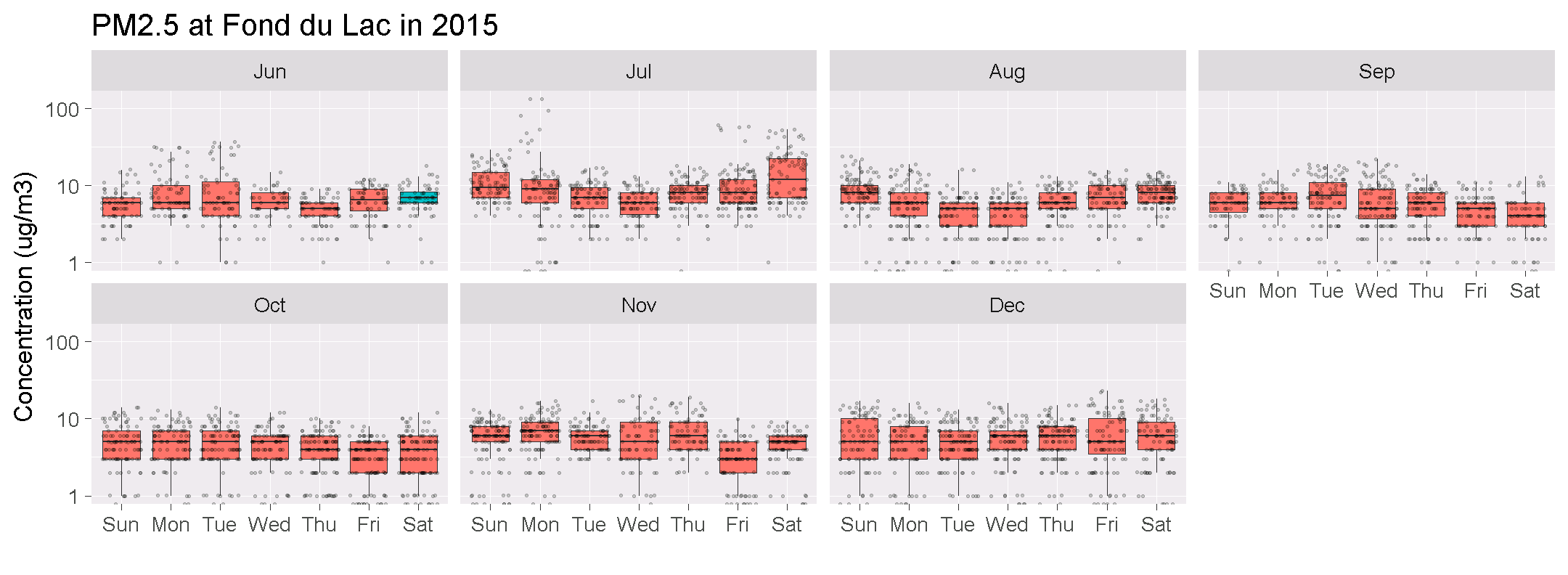<!-- --> --- class: inverse, middle, center # `...Bonus chart...` --- # Minnesota mountains -- ```r library(ggridges) library(ggpomological) filter(data_2015, Parameter == 88101) %>% ggplot(aes(x = Conc, y = site_catid, fill = site_catid)) + geom_density_ridges(show.legend=F) + scale_fill_pomological() + theme_pomological(base_family = 'Homemade Apple', base_size = 70, base_theme = ggridges::theme_ridges()) + labs(x="Concentration (ug/m3)", y="") + xlim(-6, 45) ``` <img src="NTF_Demo_files/figure-html/unnamed-chunk-29-1.png" height="358px" /> --- # 7| Read all the rows What if you have a ** _HUGE_ ** file? <br> > __Oh no!__ > > We just requested MET data from the weather people. > > They sent us a text file with over a **1,000,000** rows of data. > <br> --- # We will open it. To read a large text file: -- `1.` Download the file. ```r url <- "https://github.com/MPCA-air/NTF_learn_R/raw/master/data/BIG_MET_data.zip" download.file(url, "BIG_MET_data.zip") # It's stored as a ZIP file unzip("BIG_MET_data.zip", file = "MET_data_2012-2017.csv") ``` -- `2.` Read the data with __ ` read_csv() ` __. ```r # Inside the ZIP file is a huge csv text file. # For this we can run read_csv() from the readr package. library(readr) #install.packages("readr") big_met <- read_csv("MET_data_2012-2017.csv") ``` --- # Did it work? ### Let's count the rows. ```r nrow(big_met) ``` ``` ## [1] 1401457 ``` -- ```r head(big_met) ``` <table> <thead> <tr> <th style="text-align:left;"> site_catid </th> <th style="text-align:left;"> time </th> <th style="text-align:left;"> summary </th> <th style="text-align:right;"> temperature </th> <th style="text-align:right;"> precipIntensity </th> <th style="text-align:right;"> dewPoint </th> <th style="text-align:right;"> humidity </th> <th style="text-align:right;"> windSpeed </th> <th style="text-align:right;"> windBearing </th> <th style="text-align:right;"> visibility </th> <th style="text-align:right;"> cloudCover </th> <th style="text-align:right;"> pressure </th> <th style="text-align:left;"> precipType </th> <th style="text-align:left;"> precipAccumulation </th> </tr> </thead> <tbody> <tr> <td style="text-align:left;"> 27-003-1002 </td> <td style="text-align:left;"> 2013-09-20 05:00:00 </td> <td style="text-align:left;"> Clear </td> <td style="text-align:right;"> 63.95 </td> <td style="text-align:right;"> 0 </td> <td style="text-align:right;"> 58.59 </td> <td style="text-align:right;"> 0.83 </td> <td style="text-align:right;"> 7.80 </td> <td style="text-align:right;"> 281 </td> <td style="text-align:right;"> 9.92 </td> <td style="text-align:right;"> 0.00 </td> <td style="text-align:right;"> 1008.50 </td> <td style="text-align:left;"> NA </td> <td style="text-align:left;"> NA </td> </tr> <tr> <td style="text-align:left;"> 27-003-1002 </td> <td style="text-align:left;"> 2013-09-20 06:00:00 </td> <td style="text-align:left;"> Clear </td> <td style="text-align:right;"> 62.88 </td> <td style="text-align:right;"> 0 </td> <td style="text-align:right;"> 54.82 </td> <td style="text-align:right;"> 0.75 </td> <td style="text-align:right;"> 8.93 </td> <td style="text-align:right;"> 265 </td> <td style="text-align:right;"> 9.94 </td> <td style="text-align:right;"> 0.02 </td> <td style="text-align:right;"> 1008.76 </td> <td style="text-align:left;"> NA </td> <td style="text-align:left;"> NA </td> </tr> <tr> <td style="text-align:left;"> 27-003-1002 </td> <td style="text-align:left;"> 2013-09-20 07:00:00 </td> <td style="text-align:left;"> Clear </td> <td style="text-align:right;"> 60.98 </td> <td style="text-align:right;"> 0 </td> <td style="text-align:right;"> 54.73 </td> <td style="text-align:right;"> 0.80 </td> <td style="text-align:right;"> 8.32 </td> <td style="text-align:right;"> 272 </td> <td style="text-align:right;"> 10.00 </td> <td style="text-align:right;"> 0.00 </td> <td style="text-align:right;"> 1008.76 </td> <td style="text-align:left;"> NA </td> <td style="text-align:left;"> NA </td> </tr> <tr> <td style="text-align:left;"> 27-003-1002 </td> <td style="text-align:left;"> 2013-09-20 08:00:00 </td> <td style="text-align:left;"> Clear </td> <td style="text-align:right;"> 60.71 </td> <td style="text-align:right;"> 0 </td> <td style="text-align:right;"> 54.68 </td> <td style="text-align:right;"> 0.81 </td> <td style="text-align:right;"> 10.57 </td> <td style="text-align:right;"> 262 </td> <td style="text-align:right;"> 10.00 </td> <td style="text-align:right;"> 0.00 </td> <td style="text-align:right;"> 1008.97 </td> <td style="text-align:left;"> NA </td> <td style="text-align:left;"> NA </td> </tr> </tbody> </table> --- # 8| R gives you a language for data .float-left[  ] <br><br> ## `gather()` pulls your data together ## `spread()` breaks it out into more columns ```r library(tidyr) #install.packages(tidyr) long_met <- big_met %>% gather(Parameter, Result, -time, -summary, -site_catid) ``` --- # dplyr gives you powerful words .float-left[  ```r install.packages("dplyr") ``` ] <br><br> __Your analysis toolbox__ <br> | Function | Returns | |:--------------|:----------------------------------------------------| | `select()` | Select individual columns to drop, keep, or reorder | | `arrange()` | Reorder or sort rows by value of a column | | `mutate()` | Add new columns or update existing columns | | `filter()` | Pick a subset of rows by the value of a column | | `group_by()` | Split data into groups by values in a column | | `summarize()` | Calculate a single summary row for an entire table | <br> --- # `glimpse()` the data <br> ```r library(dplyr) glimpse(big_met) ``` <br> --- # `summary()` of all columns <br> ```r summary(big_met) ``` --- # ` filter() ` to a single site or pollutant <br> ```r # The filter() function is in the package dplyr fond_met <- filter(big_met, site_catid == "27-017-7417") ozone_data <- filter(data_2015, Parameter == 44201) ``` --- # 9| Join related data tables Since our concentration data has the same format and only the year is changing, we can bind the two tables together with the function `bind_rows()`. 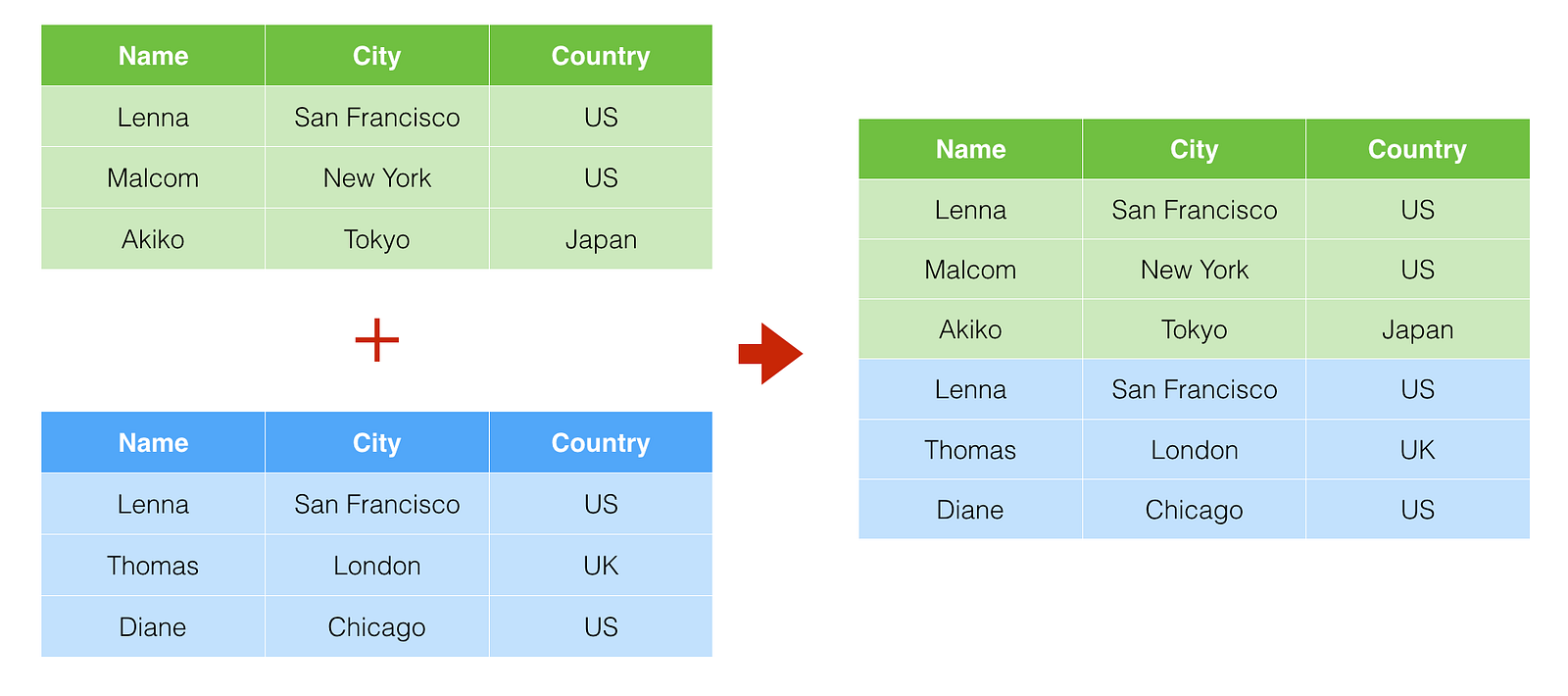 -- ```r air_data <- bind_rows(data_2015, data_2014) ``` --- # `dplyr` gives us a variety of joins A `left_join()` can pull together two tables like this: ```r starwars_data <- left_join(trainer_data, starwars) ``` .bump-right[ 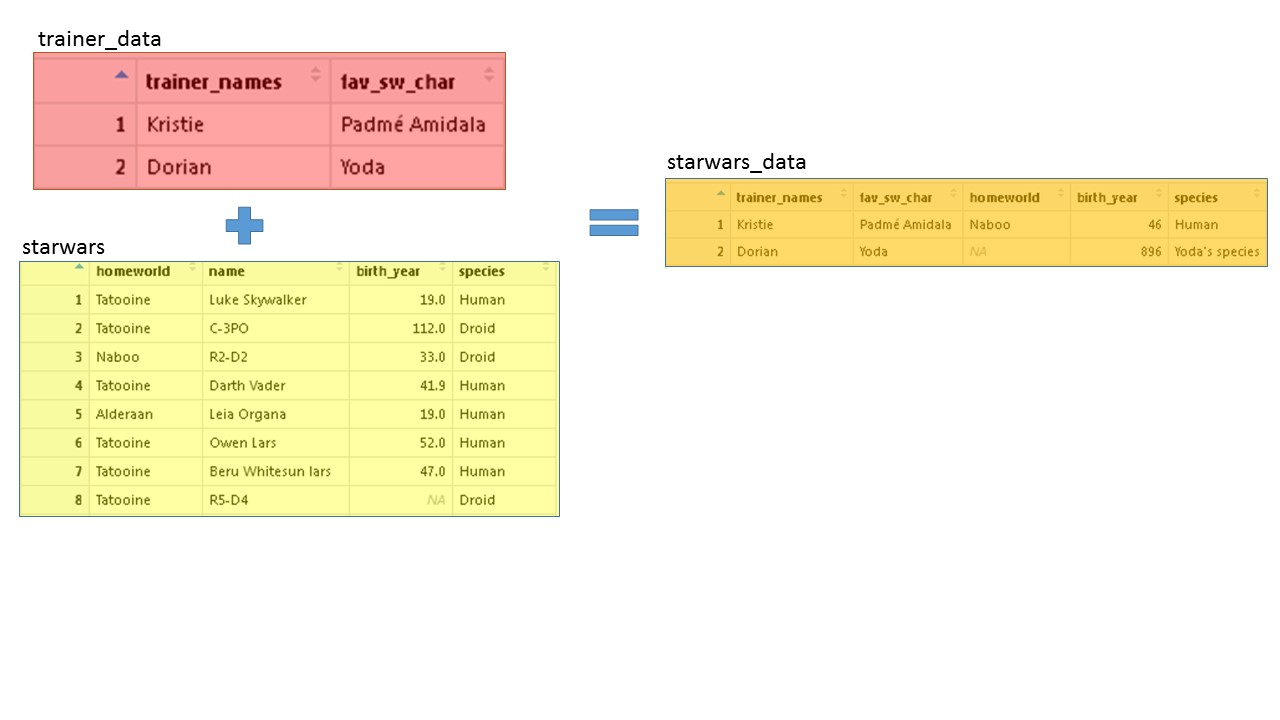 ] --- # Join MET data to monitoring data `left_join()` can pull together our weather and concentration data by the __date__ column in each table. ```r # Format the dates for both tables library(lubridate) #install.packages("lubridate") air_data <- mutate(air_data, date_time = paste0(Date, " ", Hour, ":00:00"), date_time = ymd_hms(date_time) %>% with_tz(tz = "America/Chicago")) fond_met <- mutate(fond_met, date_time = with_tz(time, tz = "America/Chicago")) %>% select(-site_catid) ``` -- ```r air_met <- left_join(air_data, fond_met, by = "date_time") ``` Now our data looks like this <table> <thead> <tr> <th style="text-align:left;"> Date </th> <th style="text-align:right;"> Hour </th> <th style="text-align:right;"> Parameter </th> <th style="text-align:right;"> Conc </th> <th style="text-align:left;"> summary </th> <th style="text-align:right;"> temperature </th> <th style="text-align:right;"> precipIntensity </th> <th style="text-align:right;"> dewPoint </th> <th style="text-align:right;"> humidity </th> <th style="text-align:right;"> windSpeed </th> <th style="text-align:right;"> windBearing </th> <th style="text-align:right;"> visibility </th> <th style="text-align:right;"> cloudCover </th> <th style="text-align:right;"> pressure </th> <th style="text-align:left;"> precipType </th> <th style="text-align:left;"> precipAccumulation </th> </tr> </thead> <tbody> <tr> <td style="text-align:left;"> 2015-06-10 </td> <td style="text-align:right;"> 22 </td> <td style="text-align:right;"> 88101 </td> <td style="text-align:right;"> 7 </td> <td style="text-align:left;"> Clear </td> <td style="text-align:right;"> 71.51 </td> <td style="text-align:right;"> 0 </td> <td style="text-align:right;"> 42.68 </td> <td style="text-align:right;"> 0.35 </td> <td style="text-align:right;"> 11.78 </td> <td style="text-align:right;"> 313 </td> <td style="text-align:right;"> 10 </td> <td style="text-align:right;"> 0.01 </td> <td style="text-align:right;"> 1009.4 </td> <td style="text-align:left;"> NA </td> <td style="text-align:left;"> NA </td> </tr> </tbody> </table> --- # Ozone | Look at correlations with `pairs()` <br><br> ```r ozone <- filter(air_met, Parameter == 44201, site_catid == "27-017-7417") pairs(select(ozone, temperature, windSpeed, Conc, Hour, humidity)) ``` --- <img src="NTF_Demo_files/figure-html/unnamed-chunk-51-1.png" width="100%" height="600px" /> --- # 10| Documentation and transparency ## **To do list** 1. Analyze data -- 2. ? -- 3. ?? -- Documentation is hard work. Much of my documentation looks like above. R forces me to write each step into a text file and __voila!__ There's documentation for myself and others. -- <div class="tip"> .pad-right[ You're encouraged to copy and **share** analyses and charts with others. It's especially fun to copy **yourself** from 2 years ago. ] </div> --- # 11| You can't break your data <div class="quiz"> .work[ ## Pop Quiz, hotshots! <br> <strong>Which of these data sources have we loaded so far?</strong><br> <i>(Hint: It may be more than one of them.)</i> ] <input type="radio"> Titanic data. <br> <input type="radio"> Our favorite Star Wars characters. <br> <input type="radio"> Meteorological data. <br> <input type="radio"> Air concentration data. <br> <input type="radio"> Pottery composition. <br> <input type="radio"> The Star Wars database. <br> </div> --- # 11| You can't break your data <br> R is always acting on a **copy** of the data. In R we give the data a name and then tell R to do something with it. <br> It looks like this: .bigtext[ ```r new_data <- read_excel("air-data.csv") ``` ] <br> -- The original raw-data file never changes. So no more worries. --- # 11| You can't break your data <br> If you want to create data from scratch, give the value a name. Let's make some values for the temperature and this conference. ```r current_temp <- 70 this_conference <- "NTFAQ" ``` <br> -- Now when we type the names into the R console it will tell us what is stored there. Hey R, what's the `current_temp`? ```r current_temp ``` ``` ## [1] 70 ``` --- # 12| Reproducible - _update with new data_ <br> > We have data for 2014 and 2015, but now we have _2016 data_. -- > Since we saved the script we can change the date in `read_excel()` to __2016__. > <br> ```r #download.file("https://github.com/MPCA-air/NTF_learn_R/raw/master/data/Hourly/AQS_1hr_FondduLac.xlsx", "AQS_Fonddulac.xlsx", mode = "wb") data_2016 <- read_excel("AQS_Fonddulac.xlsx", sheet = "2016") ``` We changed the _year_ and __BOOM!__ We get updated data. --- # Update the charts <br> Now we can follow the same steps we used before to bind the tables together or create charts. ```r air_data <- bind_rows(data_2016, air_data) ``` --- # PM2.5 waffles ```r pm_data <- filter(data_2016, Parameter == 88101) %>% group_by(site_catid, Date) %>% summarize(Conc = mean(Conc, na.rm = T)) %>% mutate(aqi_color = conc2color(Conc, "PM25") %>% factor(levels = c("#ff0000", "#DB6B1A", "#FFEE00", "#53BF33"))) %>% arrange(aqi_color) pm_sums <- group_by(pm_data, site_catid, aqi_color) %>% summarize(count = n()) %>% arrange(desc(aqi_color)) %>% ungroup() %>% mutate(aqi_color = forcats::fct_recode(aqi_color, Good = "#53BF33", Moderate = "#FFEE00", `Unhealthy for some` = "#DB6B1A", Unhealthy = "#ff0000")) %>% bind_rows(data_frame(site_catid=c("27-017-7417","27-137-7554"), aqi_color=aqi_levels[c(3,4)], count=c(0,0))) %>% arrange(desc(aqi_color)) iron( waffle(filter(pm_sums, site_catid == "27-017-7417") %>% select(aqi_color, count), rows = 7, size = 0.25, colors = c("#65B345","#F2D01A","#F26522","#B11117"), title = "Fond du Lac AQI :: 2015") + theme(legend.position="left", legend.text=element_text(size=26), plot.title=element_text(size=32)), waffle(filter(pm_sums, site_catid == "27-137-7554") %>% select(aqi_color, count), rows = 7, size = 0.25, colors = rev(c("#B11117","#F26522","#F2D01A","#65B345")), xlab = "1 square = 1 day", title = "Duluth AQI :: 2015") + theme(legend.position="left", legend.text=element_text(size=26), plot.title=element_text(size=32), axis.title.x=element_text(size=28))) ``` 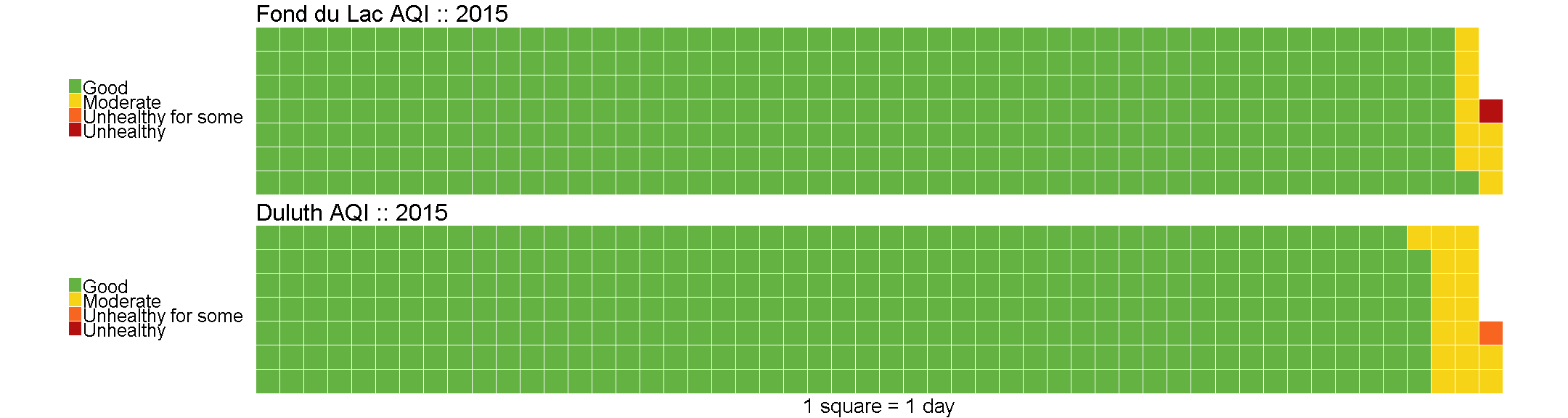<!-- --> --- # 13| Make maps and never get lost again > Where is the Fond du Lac monitor? -- __Go-Go gadget leaflet!__ ```r library(leaflet) #install.packages("leaflet") # Reduce the table to a single row for each monitoring site air_sites <- group_by(air_met, site_catid) %>% slice(1) %>% filter(SiteNum != 7001) # Quick interactive map leaflet(data = air_sites) %>% addTiles() %>% addCircleMarkers(label = ~as.character(SiteNum)) ``` --- # 13| Make maps and never get lost again <br> <div id="htmlwidget-2c4422d3e21a5d7e6305" style="width:77%;height:504px;" class="leaflet html-widget"></div> <script type="application/json" data-for="htmlwidget-2c4422d3e21a5d7e6305">{"x":{"options":{"crs":{"crsClass":"L.CRS.EPSG3857","code":null,"proj4def":null,"projectedBounds":null,"options":{}}},"calls":[{"method":"addTiles","args":["//{s}.tile.openstreetmap.org/{z}/{x}/{y}.png",null,null,{"minZoom":0,"maxZoom":18,"tileSize":256,"subdomains":"abc","errorTileUrl":"","tms":false,"noWrap":false,"zoomOffset":0,"zoomReverse":false,"opacity":1,"zIndex":1,"detectRetina":false,"attribution":"© <a href=\"http://openstreetmap.org\">OpenStreetMap<\/a> contributors, <a href=\"http://creativecommons.org/licenses/by-sa/2.0/\">CC-BY-SA<\/a>"}]},{"method":"addCircleMarkers","args":[[46.713694,46.77107,46.81826,46.743657],[-92.511722,-92.11732,-92.08936,-92.165998],10,null,null,{"interactive":true,"className":"","stroke":true,"color":"#03F","weight":5,"opacity":0.5,"fill":true,"fillColor":"#03F","fillOpacity":0.2},null,null,null,null,["7417","7549","7550","7554"],{"interactive":false,"permanent":true,"direction":"auto","opacity":1,"offset":[0,0],"textsize":"10px","textOnly":false,"className":"","sticky":true},null]}],"limits":{"lat":[46.713694,46.81826],"lng":[-92.511722,-92.08936]}},"evals":[],"jsHooks":[]}</script> --- # 13| Make maps and never get lost again #### Let's add where we are right now. ```r # Label our location leaflet(data = air_sites) %>% addTiles() %>% addCircleMarkers(label = ~as.character(SiteNum), labelOptions = labelOptions(noHide = T)) %>% addPopups(-92.48, 46.66, "<a>You are HERE</a>") ``` <div id="htmlwidget-1b69b10e57d9e3de9aa8" style="width:77%;height:370px;" class="leaflet html-widget"></div> <script type="application/json" data-for="htmlwidget-1b69b10e57d9e3de9aa8">{"x":{"options":{"crs":{"crsClass":"L.CRS.EPSG3857","code":null,"proj4def":null,"projectedBounds":null,"options":{}}},"calls":[{"method":"addTiles","args":["//{s}.tile.openstreetmap.org/{z}/{x}/{y}.png",null,null,{"minZoom":0,"maxZoom":18,"tileSize":256,"subdomains":"abc","errorTileUrl":"","tms":false,"noWrap":false,"zoomOffset":0,"zoomReverse":false,"opacity":1,"zIndex":1,"detectRetina":false,"attribution":"© <a href=\"http://openstreetmap.org\">OpenStreetMap<\/a> contributors, <a href=\"http://creativecommons.org/licenses/by-sa/2.0/\">CC-BY-SA<\/a>"}]},{"method":"addCircleMarkers","args":[[46.713694,46.77107,46.81826,46.743657],[-92.511722,-92.11732,-92.08936,-92.165998],10,null,null,{"interactive":true,"className":"","stroke":true,"color":"#03F","weight":5,"opacity":0.5,"fill":true,"fillColor":"#03F","fillOpacity":0.2},null,null,null,null,["7417","7549","7550","7554"],{"interactive":false,"permanent":true,"direction":"auto","opacity":1,"offset":[0,0],"textsize":"10px","textOnly":false,"className":"","sticky":true},null]},{"method":"addPopups","args":[46.66,-92.48,"<a>You are HERE<\/a>",null,null,{"maxWidth":300,"minWidth":50,"autoPan":true,"keepInView":false,"closeButton":true,"className":""}]}],"limits":{"lat":[46.66,46.81826],"lng":[-92.511722,-92.08936]}},"evals":[],"jsHooks":[]}</script> --- # 14| Map weather alerts .center[ <img src="images/flood_map.png" width="60%", style="margin-top: -20px;"> ] --- # 14| Map weather alerts ```r library(weatherAlerts) #devtools::install_github("ianmcook/weatherAlerts") #devtools::install_github("ianmcook/weatherAlertAreas") library(leaflet) alerts <- getAlerts("CA") # takes about 20 seconds severity <- alerts@data$severity ``` -- ```r leaflet() %>% addTiles() %>% addPolygons(data = alerts, popup = ~paste0(event, summary)) ``` --- # Return of the roses Remember the first pollutant rose we looked at? Let's load the Fond du Lac data set into the tool to see if we can find any PM2.5 soruces. __First save the data.__ ```r air_met %>% select(site_catid, Date, Parameter, Conc, temperature, windSpeed, windBearing, Latitude, Longitude) %>% arrange(Parameter, Conc) %>% write_csv("air_met.csv") ``` -- <br> __Open the Pollution rose tool >__ [Pollution rose mapper](https://air-data.shinyapps.io/pollution-roses/) --- # 15| Online community + Us + You .bigtext[**Join the R community**] .float-left[  ] .float-right[ - #### `#rstats` Twitter - #### Local R User groups - #### Online courses and blogs: Coursera, Data Camp, Kaggle - #### R conferences _(all types of data)_ - #### RLadies Global .center[ 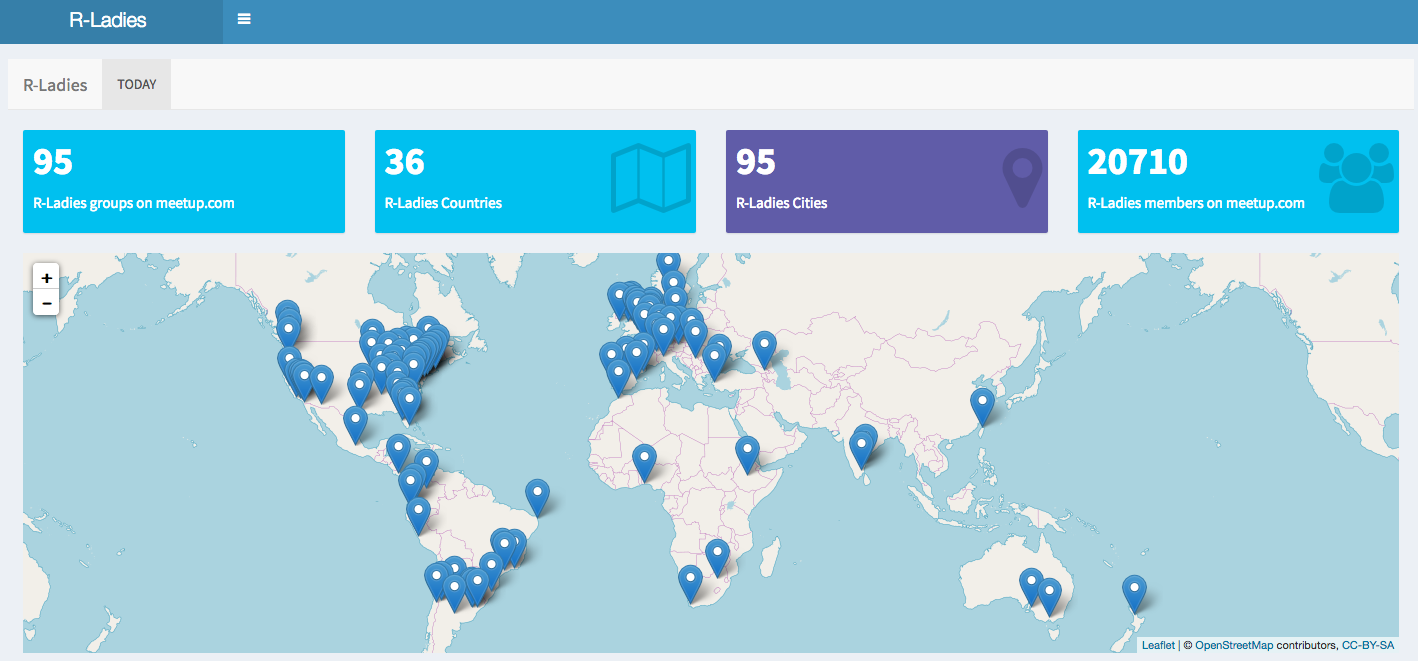 ] ] --- # Congratulations! <br> ```r library(cowsay) say("Meowww. You deserve a break.", "cat") ``` ``` ## ## -------------- ## Meowww. You deserve a break. ## -------------- ## \ ## \ ## \ ## |\___/| ## ==) ^Y^ (== ## \ ^ / ## )=*=( ## / \ ## | | ## /| | | |\ ## \| | |_|/\ ## jgs //_// ___/ ## \_) ## ``` --- # Congratulations! You've completed the fast R Intro and are ready for Day 1 of R Camp. <br> <img src="https://assets.wired.com/photos/w_2048/wp-content/uploads/2015/02/catinbox_simba_by-jacme31.jpg" width="55%" align="right" style="margin-left: 35px; max-width: 55%" /> <br> In the mean time download the learning package _swirl_ or try a [Coursera](https://www.coursera.org/specializations/jhu-data-science) course. If you think you might be a __pirate__, you can sail the high seas [here](http://tryr.codeschool.com/). <br><br> Come talk data with us or send us an e-mail. [Kristie.Ellickson@state.mn.us]() and [Dorian.Kvale@state.mn.us]() --- # Back to GitHub <br><hr><br><br> Return to the project's [GitHub page](https://github.com/MPCA-air/NTF_learn_R). This presentation was made with `Rmarkdown` and Yihui's ` xaringan ` package. <br><br><br><br><br> <hr>